


Memory leaks in Node.js services have a particular flavor of pain that’s worse than the C/C++ kind. The garbage collector handles freeing for you, so you can’t have a classic forgotten-malloc leak — but you can absolutely retain references to objects you’re done with, and the GC will dutifully keep them alive forever. The result is a service that runs fine for an hour, then starts using more RAM, then starts swapping, then OOM-kills itself at 2am. This article walks through how to diagnose this kind of leak using Node’s built-in inspector and Chrome DevTools, with a real reproducible leak demonstration captured from a docker run.
The leak shape
The classic Node.js memory leak looks like this:
const cache = new Map();

function handleRequest(req) {
  cache.set(req.id, computeExpensiveThing(req));
  return cache.get(req.id);
}
The intent was a cache. The reality is an unbounded leak — every request adds an entry, nothing ever removes one. RAM grows linearly with request count and never comes back down. This pattern is the most common leak shape I’ve seen in production Node services because it looks correct on first read.
The other common shapes:
- Event listeners that aren’t removed. A handler attached on connection setup that’s never detached on connection teardown. Each connection adds a listener, the underlying object holds them all in an array, the array grows forever.
- Timer references. A
setIntervalcreated in a request handler with noclearIntervalon cleanup. Each request leaves a live interval. - Closure capture. A function defined inside a hot loop that captures a large object by reference. Even after the loop iteration is over, the closure keeps the object alive as long as the closure exists.
- Module-level state that grows. Any
const log = []at module scope that gets pushed to but never trimmed.

A reproducible leak in 20 lines
To make the techniques concrete, here’s a synthetic leak you can run in any Node container:
const leaks = [];
let counter = 0;
const interval = setInterval(() => {
  leaks.push(new Array(100000).fill(counter));
  counter++;
  if (counter % 5 === 0) {
    const m = process.memoryUsage();
    console.log(`iter ${counter}: heapUsed=${(m.heapUsed/1024/1024).toFixed(1)}MB rss=${(m.rss/1024/1024).toFixed(1)}MB`);
  }
  if (counter >= 30) clearInterval(interval);
}, 50);
Each iteration pushes a 100,000-element array into a module-level array that’s never cleared. Run it in a docker container against node:22 and the output looks like this:
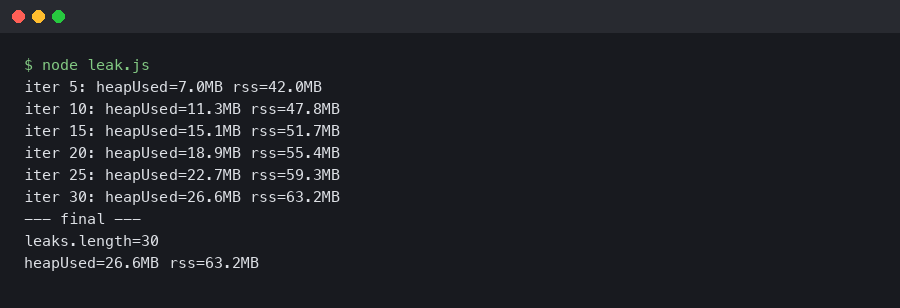
The heap goes from 7MB at iteration 5 to nearly 27MB at iteration 30 — about 4MB of growth per 5 iterations, which matches the math: each 100k-int array is roughly 800KB and we’re adding 5 per checkpoint. RSS grows in lockstep. This is a textbook leak signature: linear growth, no plateau, no recovery after GC.
The diagnostic toolkit
Node ships with everything you need to diagnose leaks — you don’t need any third-party tools for the basic workflow. The two pieces:
- process.memoryUsage() — returns the current heap usage stats. Useful for quick logging from inside the application without attaching a debugger.
- –inspect / –inspect-brk — starts the V8 inspector protocol on a local port. Chrome DevTools (or VSCode, or any other compatible debugger) can attach to it and capture heap snapshots, allocation timelines, and CPU profiles.
Start your application with the flag:
node --inspect=0.0.0.0:9229 server.jsThen in Chrome, navigate to chrome://inspect. You should see your Node process listed under “Remote Target”. Click “inspect” and a DevTools window opens connected to your Node process. The Memory tab is the one you want.
The three-snapshot technique
The single most useful pattern for finding what’s leaking is the three-snapshot diff. Here’s the recipe:
- Let your service warm up. Run for a couple of minutes so the initial caches and pools are populated. Take a heap snapshot in the Memory tab. This is your baseline.
- Send a meaningful amount of traffic — enough that you’d expect a leak to be visible. For a web service, a few hundred requests against the suspected endpoint. For a background worker, run it through a few minutes of normal work. Take a second heap snapshot.
- Send more traffic, similar volume to step 2. Take a third snapshot.
Now use the snapshot comparison view. Select the third snapshot and change the dropdown from “Summary” to “Comparison”. Set the comparison base to the first snapshot. This shows you every type of object that has more instances in the latest snapshot than in the baseline, sorted by delta.
The key trick: any object type that appears in the second snapshot’s delta but stays roughly stable between the second and third is probably normal warmup. Any object type that grew from snapshot 1 to snapshot 2, AND grew again from snapshot 2 to snapshot 3, is your leak. The growth is linear with traffic, which is the unmistakable leak signature.
Reading the retainers chain
Once you’ve identified a leaking object type, you need to figure out what’s keeping it alive. Click into one of the leaking instances and look at the Retainers panel at the bottom. This shows the chain of references that’s preventing garbage collection — the object is held by X, which is held by Y, which is held by Z, all the way back to a GC root.
The retainer chain almost always tells you exactly what to fix:
- If the retainer chain ends in a Map or array at module scope, that’s an unbounded cache. Add an LRU policy or a TTL.
- If it ends in an EventEmitter’s
_eventsarray, you have an unremoved listener. Find the matchingofforremoveListenercall. - If it ends in a closure (look for “context” entries), you have a function holding a reference to data it doesn’t actually need. Move the data outside the closure or null it out.
- If it ends in a Timer object, you have a setInterval or setTimeout that’s not being cleared.
Allocation timeline for short-lived leaks
The three-snapshot technique works for steady-state leaks. For leaks that happen during a specific operation — say, the leak only manifests during file uploads — you want the Allocation Instrumentation timeline. This is in the same Memory tab, second radio button.
Start the recording, perform the operation a few times, stop the recording. The result is a per-second histogram of allocations. Bars that stay tall (the allocations weren’t freed) are the candidates for the leak. Click into a tall bar to see the specific allocations and their stack traces — DevTools shows you the exact line of source code that allocated the object, which usually points directly at the bug.
The –expose-gc flag and forced GC
One more flag worth knowing: --expose-gc exposes a global gc() function in your Node process. This is useful for testing whether memory growth is a real leak or just delayed garbage collection. The pattern:
// In your test harness
doSomeWork();
global.gc();
const before = process.memoryUsage().heapUsed;
for (let i = 0; i < 1000; i++) doSomeWork();
global.gc();
const after = process.memoryUsage().heapUsed;
console.log(`heap delta: ${(after - before) / 1024} KB`);
If the heap delta is roughly zero across 1000 iterations, your work isn’t leaking. If it’s growing linearly with the iteration count, you have a leak. The forced GC eliminates the noise from delayed collection. Don’t use this in production — it stalls the event loop — but it’s invaluable in a test environment.
The bottom line
Node memory leaks are almost always one of four shapes (unbounded cache, unremoved listener, uncleared timer, or closure capture), and the diagnostic workflow is the same for all of them: start the process with –inspect, attach Chrome DevTools, take three snapshots with traffic between them, compare, find the object type that grew linearly, and follow the retainer chain back to the source. The whole flow takes ten minutes once you’ve done it once. The only hard part is having the discipline to take the snapshots in a clean enough state that the comparison tells you something useful — warm up first, hit a real workload, and don’t try to diagnose against a service that’s been running for a week with a thousand confounding effects.