


Honestly, I think I broke the Cmd key on my last MacBook just from all the context switching. You know the dance — write code, save, Cmd+Tab, refresh, F12, click “Console,” read the error, Cmd+Tab, fix the code, repeat. It’s exhausting.
But I finally stopped doing that a few weeks ago. I moved my entire browser debugging workflow directly into the terminal, and I’m kicking myself for not doing it sooner. We’ve had the technology to do this for years — Chrome DevTools Protocol (CDP), Puppeteer, Playwright — but we always treated them as testing tools, not building tools. That was a mistake.
The “Headless-ish” Workflow
The epiphany hit me while debugging a nasty hydration error on a Next.js 16 app last Tuesday. The error only happened when a specific cookie was present, which meant my automated tests (running in a clean environment) couldn’t reproduce it. I needed my actual, logged-in browser session, but I wanted the speed of a CLI tool.
So I hooked into the running browser instance. Instead of looking at the Chrome window, I streamed the browser’s console logs directly to my terminal stdout. Suddenly, my terminal wasn’t just for running the server; it was the runtime environment. I could see the DOM updates, network failures, and console.log outputs right next to my source code. No tabbing required.
How It Actually Works
Most developers know you can run Chrome in headless mode. Fewer know you can attach a debugger to a standard Chrome window that you’re already using.
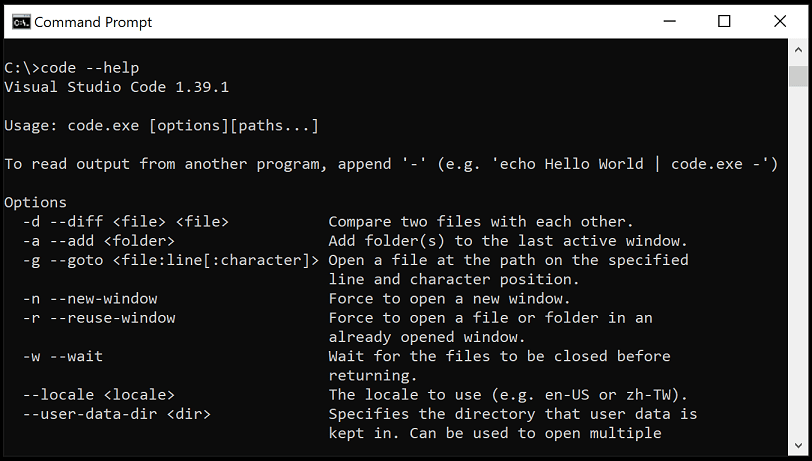
/Applications/Google\ Chrome.app/Contents/MacOS/Google\ Chrome \
  --remote-debugging-port=9222 \
  --user-data-dir="/tmp/chrome-debug-profile"
Once that’s open, you can use a simple Node script to hijack the console. I whipped up a quick utility using chrome-remote-interface (still the most reliable wrapper for this, even in 2026) to pipe everything to my shell.
const CDP = require('chrome-remote-interface');

async function streamConsole() {
    let client;
    try {
        // Connect to the open browser tab
        client = await CDP();
        const { Runtime, Page } = client;

        await Promise.all([Runtime.enable(), Page.enable()]);

        console.log('Connected to Chrome. Streaming logs...');

        // Pipe browser console to terminal
        Runtime.consoleAPICalled((entry) => {
            const type = entry.type.toUpperCase();
            const val = entry.args.map(a => a.value || a.description).join(' ');

            if (type === 'ERROR') {
                console.error([BROWSER-ERR] ${val});
            } else {
                console.log([${type}] ${val});
            }
        });

        // Keep it alive
        await new Promise(() => {});
    } catch (err) {
        console.error(err);
    } finally {
        if (client) {
            await client.close();
        }
    }
}

streamConsole();
Injecting Reality into the DOM
Reading logs is passive. The real fun starts when you need to manipulate the page. I was working on a scraping script for a legacy internal dashboard (the kind built with jQuery soup and zero API documentation).
Usually, I’d write a selector, run the script, watch it fail, tweak the selector, run it again. It’s slow. The “feedback loop” is about 15-20 seconds per attempt.
By keeping the session active and sending commands via the terminal, I cut that down to milliseconds. I set up a REPL (Read-Eval-Print Loop) that evaluates JavaScript directly in the browser context.
I type:
> document.querySelector('.submit-btn').click()And the button clicks in the window behind my terminal. I can fill forms, trigger events, and navigate pages without ever leaving the command line. It feels like being a wizard. Or a hacker in a 90s movie. Same thing.
The “Logged In” Advantage
I needed to debug a Google Docs extension I’m hacking on. Google’s auth flows are a nightmare to automate. If you try to spin up a fresh Puppeteer instance, you have to handle 2FA, CAPTCHAs, and “suspicious login attempt” warnings. It takes five minutes just to get to the starting line.
With this terminal-attached approach, I just logged in once manually in the browser window. The session persisted. My CLI tool hooked into that already authenticated session. I could run scripts against my actual Gmail or Notion data without setting up a single API key or auth token. It just worked.
Benchmarks: Is it actually faster?
I’m a skeptic when it comes to “productivity hacks,” so I actually timed this. I measured the time it took to identify and fix a DOM selector bug in a web scraper I maintain.
- Old Method (Edit code -> Save -> Run Headless Script -> Read Error): Average of 14.5 seconds per iteration.
- New Method (Attached Session -> Type in Terminal REPL): Average of 2.8 seconds per iteration.
That’s a 5x speedup. When you’re iterating on a complex UI or a messy scraper, that difference is the gap between maintaining flow state and getting distracted by Twitter (or X, whatever we’re calling it this week).
We are seeing a shift in how we build. The browser is becoming less of a visual canvas and more of a rendering engine that we control programmatically.
Tools are evolving to treat the browser as a backend service. Whether you’re using advanced AI coding agents or just simple scripts, the interface is moving away from the mouse and toward the shell.
If you’re still manually clicking through forms to test your validation logic, stop. Hook your terminal into your browser. Your Cmd key will thank you.