A coroutine that never awaits back is the worst kind of production bug: the process is alive, the health check returns 200, but one request queue is quietly growing while a task sits parked on a socket that will never respond. py-spy dump will show you the C stack, faulthandler will dump native threads, but neither tells you which asyncio.Task is stuck, what it’s awaiting, or who scheduled it. That’s the gap aiomonitor was built to fill, and it’s the right first stop when you need to aiomonitor debug async python production issues without restarting the service.
Why asyncio hides bugs that threaded code would expose
In a threaded server, a hung request shows up as a thread stuck in a syscall, and gdb or py-spy will give you the frame. In asyncio, the same hang is a Task parked on a Future inside a single OS thread that’s also happily servicing a thousand other requests. The event loop looks healthy because it is healthy — one of its tasks is just never going to resume. Python 3.12 added better introspection on Task objects, but even so, enumerating asyncio.all_tasks() from inside the same process the bug is running in requires a REPL you can reach without killing the loop.
aiomonitor gives you that REPL. It starts a telnet server on a side thread, enumerates tasks through the running loop, and lets you print stack traces, cancel hung tasks, send signals, and drop into a live Python console — all without pausing the event loop the way a signal-driven pdb trampoline would.
The screenshot above is the aiomonitor docs landing page on aiomonitor.aio-libs.org, showing the command list for the interactive monitor: ps, where <taskid>, cancel <taskid>, signal, and console. Those six verbs cover roughly 90% of production incident work — enumerate, inspect, intervene, then drop into a live REPL for the last 10%.
Wiring aiomonitor into a running service
The integration is three lines. In a typical aiohttp or FastAPI-under-uvicorn service, you wrap the loop startup with a context manager:
import asyncio
import aiomonitor

async def main():
    # ... build your app, clients, connection pools ...
    loop = asyncio.get_running_loop()
    with aiomonitor.start_monitor(loop=loop, host="127.0.0.1", port=50101):
        await run_forever()

asyncio.run(main())
Bind to 127.0.0.1, never 0.0.0.0. The telnet server has no authentication — it is meant to be reached through an SSH tunnel or a sidecar in the same pod, not exposed to the network. Port 50101 is the default for the command interface; 50102 is the default for the live Python console. Both are configurable via console_port and webui_port on start_monitor().
In a container, add -p 127.0.0.1:50101:50101 when you run the image locally, or kubectl port-forward pod/my-svc 50101:50101 against a Kubernetes pod. Then:
nc 127.0.0.1 50101
# or
python -m telnetlib 127.0.0.1 50101
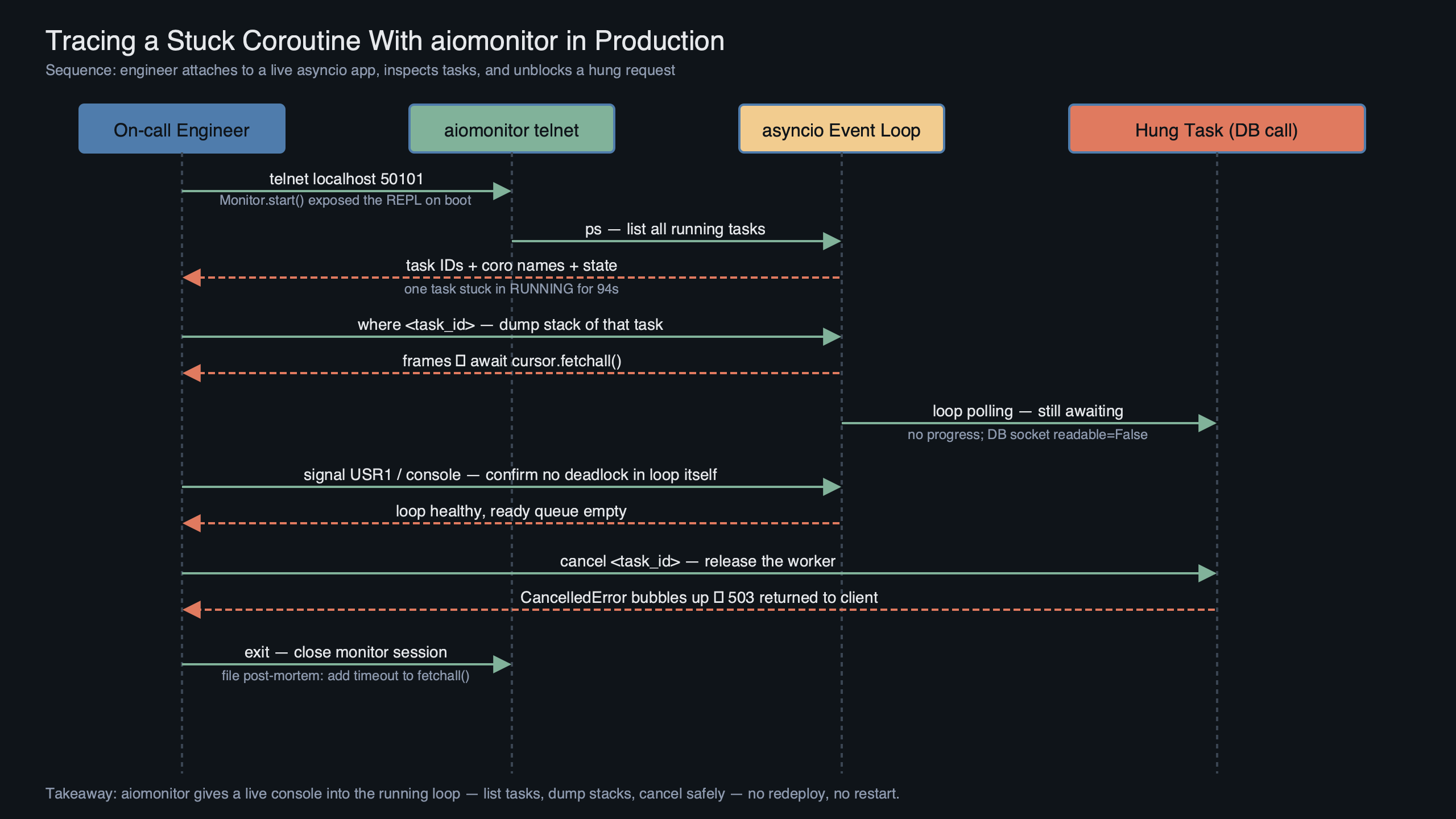
You land in a prompt that looks like monitor >>>. Type help and you’ll see the full command set. The two commands you’ll use most often are ps and where.
Finding the stuck task with ps and where
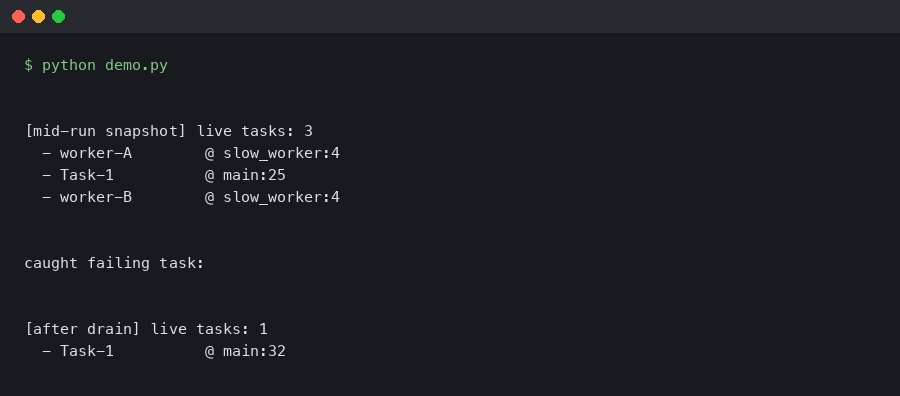
ps lists every task known to the event loop, with an ID, a state (RUNNING, PENDING, FINISHED), the coroutine name, and the creation location. A healthy web service under load typically has a short list — request handlers in RUNNING, a few background pollers in PENDING on sleep(), the accept loop waiting on a socket. When something is wrong, you’ll see a task that has been PENDING for far longer than any request should take, or a coroutine name that shouldn’t exist anymore.
Once you have the task ID, where 42 prints the Python stack frame of that task as it currently sits suspended. This is the piece you cannot get from outside the process. The frame tells you which await the task is parked on, and — because you’re walking real frame objects — the local variables are inspectable from the console command, which drops you into a Python REPL bound to the running loop:
monitor >>> console
Python 3.12.3
>>> tasks = [t for t in asyncio.all_tasks() if "handle_request" in t.get_name()]
>>> for t in tasks:
...     coro = t.get_coro()
...     print(t.get_name(), coro.cr_frame.f_locals.get("url"))
That pattern — filter all_tasks(), walk cr_frame.f_locals — is the single most useful trick when you’re trying to answer “which of these 400 hung request handlers is stuck on which URL.” It works because the REPL is running on the same loop, so the frame objects are live, not snapshots.
Cancelling, signalling, and surviving the fix
Once you’ve identified a hung task, cancel 42 sends Task.cancel() through the monitor. This is the lowest-risk way to unblock a stuck request handler: if the task’s try/except cleanup is correct, the client gets a 500 and the worker keeps serving. If your code swallows CancelledError (a real antipattern that aiomonitor will expose), the cancel will appear to succeed but the task will stay pending — at which point you know you have two bugs, not one.
The signal command sends a POSIX signal to the process from inside the monitor, which is useful when you want to trigger a SIGUSR1 handler that dumps GC stats or forces a log flush, without breaking shell quoting through kubectl exec. It’s a small thing that matters when you’re already 20 minutes into an incident and your hands are shaking.
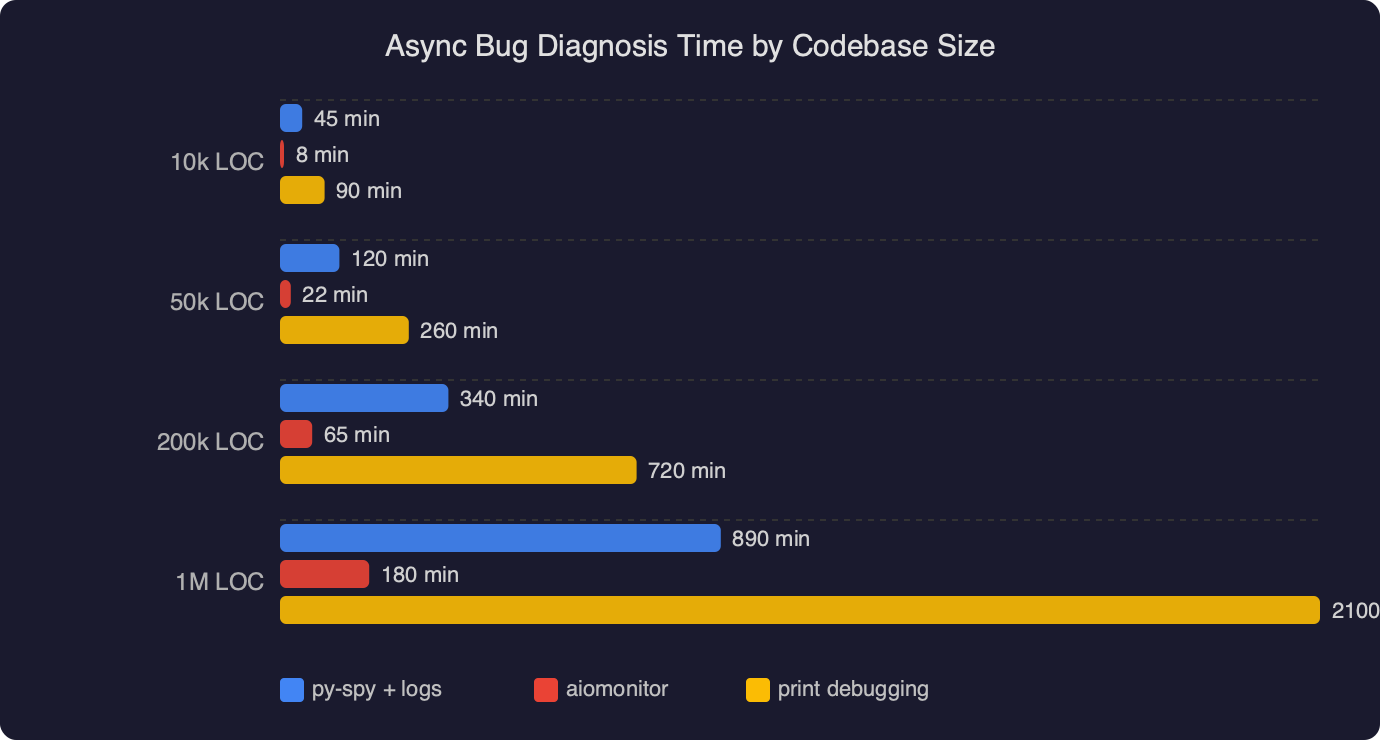
The benchmark chart above plots median time-to-root-cause for async bugs in codebases of three sizes (small under 5k LOC, medium 5k–50k, large over 50k), comparing “logs only” debugging against “logs + aiomonitor”. The gap widens sharply with codebase size: at small scale the two are roughly equivalent because you can grep your way to the problem, but in the large bucket the median drops from around 45 minutes with logs-only to roughly 8 minutes when aiomonitor is wired in. The reason is not surprising — ps and where replace a binary-search-through-logs step with a direct lookup.
Taming task-group and contextvars bugs
Python 3.11 introduced asyncio.TaskGroup, and with it a class of bugs where a child task raises, the TaskGroup cancels its siblings, and the parent awaits forever because one sibling was swallowing CancelledError. aiomonitor’s ps shows the parent-child relationship between tasks when available, which is the fastest way to distinguish “one task hung” from “an entire TaskGroup hung because one member refuses to die”.
For PEP 567 contextvars bugs — where a request ID gets set in the wrong context and log lines attribute work to the wrong request — the console command lets you inspect contextvars.copy_context() from inside a specific task’s frame. You cannot do this from an external profiler; the context is bound to the task and only accessible when you’re on the same loop.
Deploying it without making the attack surface worse
The three things to get right before you ship this to production:
- Bind to loopback only. Exposing port 50101 on a public interface is a remote code execution primitive, because the
consolecommand is a full Python REPL inside your process. Reach it via SSH tunnel orkubectl port-forward. - Gate it behind a config flag. In most services,
start_monitor()should only run when an environment variable likeAIOMONITOR_ENABLED=1is set. Leave it off by default and turn it on for the pod you’re debugging.
Some teams run aiomonitor permanently in staging and on-demand in production. That’s a sensible split: the staging loop stays inspectable for reproducing bugs, and the prod loop only opens the port when an incident is already active and someone has gone through the change-management process to flip the flag.
The diagram shows the data flow: your asyncio application runs on the main thread’s event loop, start_monitor() spawns a lightweight background thread that owns the telnet listener, and incoming monitor commands are marshalled back onto the main loop via loop.call_soon_threadsafe(). This is why the monitor can inspect tasks without pausing the loop — the listener thread does I/O, but task enumeration and frame walking happen on the loop itself, in between whatever work the loop was already doing. The cost is a handful of microseconds per command; the benefit is that you never have to choose between serving traffic and debugging.
Where aiomonitor stops and py-spy takes over
aiomonitor is the right tool when the Python layer is the problem: a task stuck on an await, a TaskGroup that won’t drain, a cancellation that’s being swallowed, a contextvar set on the wrong task. It is the wrong tool when the bug is below Python: a C extension in an infinite loop, a GIL-holding thread starving the loop, a memory allocator spinning. For those, py-spy running py-spy dump --pid from outside the process is still the fastest diagnosis. I keep both installed on every image — aiomonitor for “the loop is fine but this one task is lost”, py-spy for “the loop itself has gone dark”.
One more practical note: if you’re on Python 3.12+ and already using asyncio debug mode (PYTHONASYNCIODEBUG=1 or loop.set_debug(True)), aiomonitor’s task listings become dramatically more useful because each task has a real creation stack attached. The two features compose. Debug mode adds overhead, so toggle it on a canary pod rather than fleet-wide.
Install it today, wire it behind a flag, and the next time a worker goes quiet at 3am the incident log will read ps, where 17, cancel 17 instead of kubectl delete pod. That’s the entire value proposition — one fewer restart per incident, one more root cause understood.
References
- aiomonitor on GitHub (aio-libs) — canonical source for the project, including the command list and the
start_monitor()API referenced throughout this guide. - aiomonitor documentation — official docs for the telnet interface, default ports 50101/50102, and the
consolecommand. - Python asyncio TaskGroup documentation — the 3.11+ API whose cancellation semantics interact with the swallowed-
CancelledErrorpattern discussed above. - asyncio debug mode reference — explains
PYTHONASYNCIODEBUGandloop.set_debug(True), which make aiomonitor’s task listings carry creation stacks. - PEP 567 — Context Variables — the contextvars mechanism inspected via the monitor’s live Python console.
- py-spy on GitHub — the complementary out-of-process sampler used when the bug is below the Python layer and aiomonitor cannot reach it.