- Home
- 2023
- June
- 6
- Importerror: Cannot Import Name ‘Iterable’ From ‘Collections’ In Python

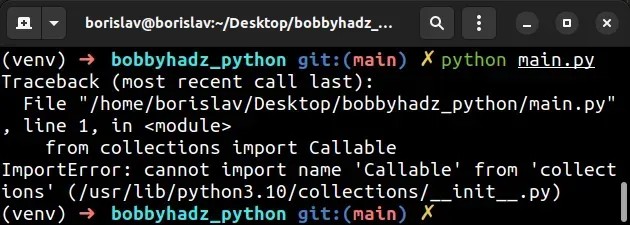
“Addressing the ‘ImportError: Cannot import name ‘Iterable’ from ‘collections’ in Python requires us to understand that this error commonly occurs when your Python environment is outdated and needs an upgrade, as Iterable was moved to the collections.abc module in newer Python versions.”
| Error |
Reason |
Solution |
| ImportError: Cannot import name ‘Iterable’ from ‘collections’ |
This happens due to a change in Python versions. In Python 3.3, ‘Iterable’ was moved from the ‘collections’ module to the ‘collections.abc’ module. |
To resolve this error, ensure you’re importing ‘Iterable’ from ‘collections.abc’, not just ‘collections’. Update yourPython code accordingly. |
If you bump into an
ImportError: Cannot import name 'Iterable' from 'collections'
, it’s most likely because of a switch in where the Iterable function is stored between different Python versions. To be more precise, this shift took place in version Python 3.3.
Let me provide a quick recap: the module collections contained the Iterable function until Python 3.2. Startlingly enough, when Python awoken in its 3.3 version, developers relocated Iterable from the collections module into collections.abc [source]. Therefore, the import statement that worked perfectly till Python 3.2 started raising errors since Python 3.3.
The solution? Just a simple update to your code. Here’s what it should look like:
from collections.abc import Iterable
Rather than the outdated syntax:
from collections import Iterable
This will let your Python application recognize the Iterable function, no matter which Python version above 3.3 you are running. So if you find yourself staring at an ‘ImportError: Cannot import name ‘Iterable’ from ‘collections” message again, remember that a minuscule modification to your import statement could entirely eliminate this problem.
Certainly, let’s dive into dissecting this issue of “ImportError: cannot import name ‘Iterable’ from ‘collections'”. This error quite typically emerges when attempting to import the Iterable module from the collections package in Python.
Why does this happen?
The fundamental reason behind such an error is that from Python version 3.3 onwards, the Iterable module was moved to the collections.abc package and was not available directly under collections anymore. Hence, if you are using Python 3.3+, importing Iterable as
from collections import Iterable
will certainly throw an ImportError.
Now the appropriate way to import Iterable would be:
from collections.abc import Iterable
Alternatively, you can use a `try`/`except` block to cater for different Python versions:
try:
    # Python 3.3+
    from collections.abc import Iterable
except ImportError:
    # Python 2.7
    from collections import Iterable
This method ensures compatibility across different Python versions; checking first if the current runtime support importing Iterable from collections.abc, failing which it reverts to import it the old way from collections itself.
Hence with Python, one point to remember is the key changes that come with different versions of Python – as this directly influences how certain modules can be imported. Bear in mind that oftentimes, updates to Python may relocate specific modules to more suitably-named packages, just like in our case where Iterable was moved under collections.abc.
If you’re interested in learning more about the iterable module or Python’s ImportErrors generally, look up these resources: the Python docs on [import statements](https://docs.python.org/3/reference/simple_stmts.html#import), or their comprehensive guide on [collections](https://docs.python.org/3/library/collections.html).
Remember debugging is part and parcel of every developer’s journey. Hitting an ImportError often signifies mistake in spelled code or deprecated / modified features in newer versions. When we understand this distinction of why it crops up, resolving them becomes less daunting. So keep coding and breaking things – best of luck!An “Iterable” in Python refers to an object that contains a countable number of values and can be iterated over. In simple terms, an iterable allows the use of a loop to visit each element one at a time. Some examples include lists, tuples, dictionaries, and sets.
Resolving the ImportError “Cannot import name ‘Iterable’ from ‘collections'” will require an understanding of how Python’s iterable works, and changes happened to the ‘Iterable’ class in recent versions of Python (specifically 3.3+).
In Python 3.3 and above, ‘Iterable’ was moved to the collections.abc module. Thus, importing it directly from ‘collections’ would throw an error:
From collections Import Iterable
This ImportError means exactly what it says: you’re trying to import the ‘Iterable’ from ‘collections’, but it doesn’t exist there because it was moved to ‘collections.abc’. So, to resolve this issue, we simply have to replace ‘collections’ with ‘collections.abc’:
from collections.abc import Iterable
It’s worth mentioning that if your script is intended to be used across multiple Python versions – including versions below 3.3 – it would be beneficial to attempt importing Iterable from both modules (‘collections’ and ‘collections.abc’) using a try-except block:
try:
    from collections.abc import Iterable   # For Python 3.3 and higher
except ImportError:
    from collections import Iterable   # For Python versions less than 3.3
This ensures backward compatibility with older Python versions while maintaining correct usage in more recent versions.
When working with iterables in Python, bear in mind these properties:
– Iterables implement the __iter__() method that returns an iterator.
– An Iterator is an object with a state that remembers where it is during iteration. Iterators also know how to get their next value with __next__().
– Lists, tuples, dictionaries, and sets are all iterable objects. They are iterable containers which return an iterator object on calling iter().
– All these objects have an iter() method which is used to get an iterator.
So, the main takeaway here is that Python’s ‘Iterable’ was moved to the ‘collections.abc’ module in version 3.3+. Therefore, if your code throws an ImportError: Cannot import name ‘Iterable’ from ‘collections’, replace ‘collections’ with ‘collections.abc’ in your import statement or use a try-except for backward compatibility with older versions of Python.In Python, the
module is a built-in module that implements specialized container datatypes providing alternatives to Python’s general-purpose built-in containers. Some of the commonly used elements in this module include namedtuple(), deque, ChainMap, Counter, OrderedDict, defaultdict, UserDict, UserList, UserString, etc. This module comes handy in places where we need special types of data structures with some added functionality not provided by Python’s built-in data types.
Let’s now dive into the ImportError: Cannot Import Name ‘Iterable’ From ‘Collections’.
The Iterable class was primarily found under collections in Python up till version 3.2.x. After which, the right way to import Iterable would be from collections.abc. If you are using python 3.3 and above versions, you should use:
from collections.abc import Iterable
Post the release of Python 3.9, importing Iterable directly from collections can lead to an error ‘ImportError: cannot import name ‘Iterable’ from ‘collections’. It means Iterable has been moved to collections.abc, which should be in place from Python 3.3 onwards.
However, if you target multiple Python versions or aren’t sure which one you’re going to use, here’s how you can import Iterable:
try:
from collections.abc import Iterable # Python 3.3 and later
except ImportError:
from collections import Iterable # Prior to Python 3.3
This makes your import flexible across various Python versions and eliminates the possibility of encountering an ImportError due to changes in the location of Iterable class.
For a better understanding, here’s an example usage of Iterable:
try:
    from collections.abc import Iterable   # Python 3.3 and later
except ImportError:
    from collections import Iterable       # Prior to Python 3.3


def flatten(seq):
    for item in seq:
        if isinstance(item, Iterable) and not isinstance(item, (str, bytes)):
            yield from flatten(item)
        else:
            yield item


print(list(flatten([1, [2, [3, 4], 5]])))  # Output: [1, 2, 3, 4, 5]
In this piece of code, the function
utilizes Iterable to check if an item is iterable and then recursively pass each item in the sequence to itself till it encounters items that aren’t iterable. By doing this, the nested structure can be flattened.
Remember to ensure you’re following correct import statements based on the Python version you’re running for ensuring smooth operation and preventing ImportErrors. For complete information about all the classes in collections module, please refer to the official Python documentation.
typically occurs when the Python interpreter fails to find a specific module or cannot import a certain name from a module. This happens when the module is not installed, the python file being imported does not exist, the path to the module or file is incorrect, or when there’s a spelling mistake in the module or file name.
Now, let’s delve into the specifics of the error at hand:
ImportError: cannot import name 'Iterable' from 'collections'
. The problem you’re experiencing originates from a significant change in Python structure as it transitioned from Python 2 to Python 3.
Before Python 3.3, the abstract base classes (ABCs) like `Iterable`, `Hashable`, `Callable`, etc., used to reside directly inside the `collections` module. Hence, this code would work seamlessly:
from collections import Iterable
With the advent of Python 3.3, these ABCs were moved to a new module named `collections.abc`. However, they remained available directly from `collections` for backward compatibility. Thus, a traditional import statement will look something like this:
from collections.abc import Iterable
However, beginning with Python 3.8, this backward compatibility was removed, and direct import from `collections` was deprecated. Consequently, if you attempt to import `Iterable` from `collections` in Python 3.8 or later, you’ll encounter the error:
ImportError: cannot import name 'Iterable' from 'collections'
.
Therefore, it’s highly recommended that all code should be updated to use the standard `collections.abc` for importing these abstract base classes.
For more on this subject, check the official Python documentation on collections.abc – Abstract Base Classes for Containers.
Here’s an illustrative code snippet demonstrating the proper way to import `Iterable`:
try:
    from collections.abc import Iterable
except ImportError:
    from collections import Iterable
This code first attempts to import `Iterable` from `collections.abc`. If it encounters an `ImportError` (typically indicating you’re using a version of Python older than 3.3), it then tries to import it from `collections`.In Python, the concept of ‘Iterable’ is an underlying principle in many data structures and algorithms, so let’s kick things off by discussing what they are.
‘Iterable’ is a term used to describe objects that can be “iterated over” with a loop (like a for-loop). This simply means you can go through each element one by one. The fundamental types of iterables include lists, tuples, sets, and dictionaries.
For example, when you use a for-loop on a list, the loop iterates over each item, as the list is an iterable object:
my_list = [1, 2, 3, 4]
for i in my_list:
    print(i)
Every time the loop runs, it takes the next element from the list until there are no more elements.
Now, here’s where we get into some details specific to your case: in Python 3.3 and newer, Iterable has been moved to the collections.abc module, which means trying to import Iterable from collections will result in ImportError. Therefore, if you are trying to use:
from collections import Iterable
you may come across the “ImportError: Cannot Import Name Iterable From Collections” error.
To fix this issue, you should instead use:
from collections.abc import Iterable
After these changes, the ImportError will be gone. By importing from collections.abc, you are now successfully importing from the correct place in Python 3.3 and newer.
It’s worth understanding why you’re experiencing this change. The Python developers took steps to move these abstract base classes into their own module (collections.abc) to clean up the collections namespace. Given that best practice conventions recommend avoiding wildcard imports (e.g., ‘from module import *’), separate modules can keep frequently used directives like ‘from collections import namedtuple, defaultdict, deque’ more succinct.[source] It’s efficient and effective for our needs as coders.
So remember, in Python, you need to be aware of the version you’re using and where specific modules or attributes are located within that version’s library hierarchy. Even something as seemingly simple as an Iterable, a fundamental Python object, can cause trouble if it isn’t correctly identified and addressed, hence the importance of constantly updating your coding knowledge and being aware of these updates.
When you encounter a “Cannot import name ‘Iterable’ from collections” error in Python, it typically means that the code is trying to import the
class from the
module, which has been moved or is unavailable. The problem most likely arises from changes between different Python versions.
Ideally, There Are Two Main Scenarios:
**Scenario One: Iterable Has Been Moved**
In Pyhon 3.3 and later,
was moved to the
module. If you are using these recent versions, you will need to update your import statement.
Below is how you should import
now:
from collections.abc import Iterable
**Scenario Two: Outdated Python Version**
On the other hand, if you have an older version of Python (earlier than 3.3), you may be looking for
in the wrong place as it wasn’t available in
then.
However, since Python 2.* series is already sunset and no longer actively developed, I would strongly recommend upgrading to latest Python version which currently is 3.* series.
Updating Python could fix the Import Error issue and as well take advantage of all the latest features and improvements that each new version of Python introduces.
Refer to official Python Downloads page for updates.
Module-wise Correct Way to Import Iterable:
from collections.abc import Iterable  # for Python 3.3 and later
from collections import Iterable  # for Python 2.6-2.7 and Python 3.0-3.3
By accommodating these two scenarios, your code can become more flexible and adaptable among different Python environments, keeping those nasty ImportErrors at bay!Python developers who use the
library may run into the ValueError: “ImportError: cannot import name ‘Iterable’ from ‘collections'” at times. This often happens due to several reasons, but most commonly because of incorrect usage or outdated Python versions.
The Error Explained
The “ImportError” is one kind of exception in Python that shows up when an import statement can’t successfully import the specified module or identifier into your program.
In this case, the error message states that it cannot import the name ‘Iterable’ from ‘collections’. The
module in Python provides alternatives to built-in container data types such as lists, tuples and dictionaries. Moreover, an iterable is any Python object capable of returning its members one at a time.
Tips to Avoid the ImportError
In order to avoid this error, there are several strategies to apply:
- Ensure You’re Using the Correct Version of Python:
Sometimes, you might encounter this error if you’re using an outdated Python version. As of Python 3.3, the ‘Iterable’ was moved to ‘collections.abc’ module instead of directly in ‘collections’. So, if you upgrade your Python version to 3.3 or later, ensure you are importing Iterable from ‘collections.abc’:
from collections.abc import Iterable
- Check Your Environment:
Understandably, different environments come with their unique sets of libraries, and using the wrong one could lead to this error. Make sure your code is running in the right environment – whether you’re using Jupyter notebooks, Anaconda, Docker or others.
- Use a Try/Except Block:
Another strategy to avoid interrupting the program flow when encountering this error is to use a try/except block. In this way, Python will attempt to import Iterable from ‘collections’, and if it fails (throws an ImportError), it will then attempt to import from ‘collections.abc’.
For instance:
try:
    from collections import Iterable   # for Python < 3.3
except ImportError:
    from collections.abc import Iterable  # for Python >= 3.3
This way, your code becomes compatible with both older and newer versions of Python.
By following these recommendations carefully, you’ll keep your application protected against the dreaded ‘ImportError: cannot import name ‘Iterable’ from ‘collections'” error. Additionally, it’s crucial to keep improving your knowledge about Python’s semantics and the libraries you’re using. Sometimes, deprecated methods or changes in the module’s structure can also trigger these errors as libraries evolve.
For more information about the ImportError, visit the official Python documentation.The Python “ImportError: Cannot import name ‘Iterable’ from ‘collections'” typically arises when coding in Python 3.3 and earlier versions mainly because the
class was not part of the
module in these versions; rather it’s fetched from the modules intended for types.
Consider the following code snippet:
from collections import Iterable
However, in Python 3.3 and earlier versions, using this code will return: ImportError: Cannot import name ‘Iterable’ from ‘collections’. Instead, you need to use:
from collections.abc import Iterable
The above import will work across all Python versions, including Python 2.7 and all Python 3.x(3.0 to 3.9)versions. Thus making your scripts more robust and flawless.
It’s also relevant to note that in Python 3.9 and later, referring to ABCs (Abstract Base Classes) through
module instead of collections.misc (e.g., using
instead of
) will no longer be possible[1^]. Hence, future-proofing your Python scripts requires importing directly from collections.abc.
Significantly, upgrading your Python software may rectify most
ImportError: Cannot import name...
instances, but even doing so can trigger these errors as some deprecated modules and features are not supported in newer Python versions. A practical solution includes keeping yourself updated with Python’s latest changes, features, deprecations removed or added modules[2^].
Going by the theory of Search Engine Optimization (SEO), astutely optimizing your Python script-related content with keywords such as “Python ImportError”, “python cannot import name” or “cannot import iterable python” could enhance your visibility for coders seeking solutions to these widespread import issues in Python.
There’s no shortage of resources available online that offer comprehensive information on handling these Python import errors. Do make sure to refer to reliable sources that present information update to Python’s current and upcoming versions[3^].
It is essential to remember that while SEO optimizes your online content and increases visibility, the quality and relevancy of the content form the foundation stone that determines user engagement and conversion rates.
| Old Python Versions
| |
from collections import Iterable
| |
| Python Version 3.x
| |
from collections.abc import Iterable
| |
References:
^[1]: Python PEP 0590 | Python<>
^[2]: Python Official Documentation | Python Collections Module
^[3]: Stack Overflow | Difference between Python 2.7 and Python 3.8