An Express app exits with Error: listen EADDRINUSE: address already in use :::3000 the second you run docker compose up, and the obvious fix — killing whatever is on port 3000 — does nothing because the conflict is happening inside the container, not on your host. That mismatch between where the port looks busy and where it actually is busy is what makes eaddrinuse docker node debugging so frustrating. The error code is shared by Linux, macOS, and Windows socket layers, but the way Docker’s network namespaces, restart policies, and health checks interact with Node’s net.Server turns a one-line failure into a multi-layer hunt.
The rule I keep coming back to: EADDRINUSE is never about Node. Node is the messenger. The kernel rejected bind(2) because something already owns that (address, port, protocol) tuple — or the kernel thinks something does. Your job is to figure out whose namespace is holding the socket and why. Once you frame it that way, the debugging path is short.
What the error actually means at the syscall level
When Node’s server.listen(3000) runs, libuv calls bind() followed by listen(). If bind() returns EADDRINUSE, libuv surfaces it with the familiar listen EADDRINUSE message. The Node.js system errors reference documents this exact code and notes that it is raised directly from the underlying OS. That matters for debugging: the kernel table of bound sockets is the source of truth, not Node, not Docker, not your lockfile.
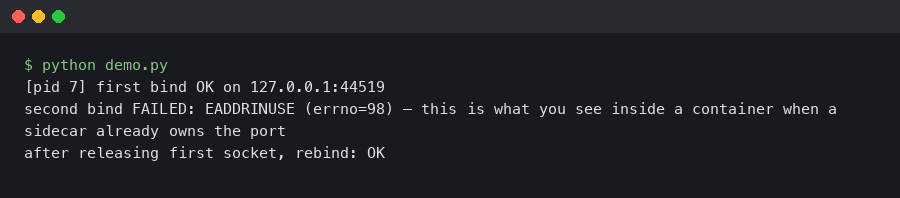
On Linux, which is what every Docker container is running even when your host is macOS or Windows, each container gets its own network namespace by default. A namespace has its own loopback interface, its own routing table, and its own socket table. A container binding 0.0.0.0:3000 inside its namespace has absolutely no conflict with another container doing the exact same thing, because they are different namespaces. The conflict only appears when Docker’s userland proxy or iptables DNAT rules on the host try to publish both containers to the same host port. That distinction is the single most useful thing to internalize before touching any code.
Reproducing the error cleanly
Before you start killing processes, reproduce the failure with a minimal service so you can see exactly which layer is complaining. A five-line Express app does the job:
import express from 'express';
const app = express();
app.get('/', (_req, res) => res.send('ok'));
app.listen(3000, '0.0.0.0', () => console.log('listening on 3000'));
Paired with a trivial Dockerfile:
FROM node:22.11-alpine
WORKDIR /app
COPY package*.json ./
RUN npm ci --omit=dev
COPY . .
EXPOSE 3000
CMD ["node", "server.js"]
Build it, run two copies with the same host port, and Docker will fail the second one instantly:
docker build -t eaddr-demo .
docker run -d --name a -p 3000:3000 eaddr-demo
docker run -d --name b -p 3000:3000 eaddr-demo
# Error response from daemon: driver failed programming external connectivity
# on endpoint b: Bind for 0.0.0.0:3000 failed: port is already allocated
Notice the wording. Docker says port is already allocated, not EADDRINUSE. That is the host-side symptom. If you instead see EADDRINUSE coming out of the Node process inside the container, you are looking at a different problem: something is binding 3000 inside the container’s namespace. The two error messages point at entirely different causes, and treating them as the same thing is why people go in circles.
Finding who owns the port on the host
When Docker refuses to publish a port, the culprit is on the host. I reach for ss first because it ships on every modern Linux distro and is faster than netstat:
sudo ss -ltnp 'sport = :3000'
That prints the process holding the listening socket. If the owning process is docker-proxy, a previous container or a running one already published 3000. docker ps --format 'table {{.Names}}\t{{.Ports}}' will show which one. If the owning process is something else — a stray node from your dev shell, a Postgres instance you forgot, a Vite dev server — kill it cleanly with kill and the PID. Avoid kill -9 unless the process refuses SIGTERM; forcing a Node process to die without shutdown hooks leaves log buffers and child processes in a bad state.
On macOS and Windows, Docker Desktop runs a LinuxKit VM, and the host tooling differs. Use lsof -nP -iTCP:3000 -sTCP:LISTEN on macOS to find the owning process. On Windows, Get-NetTCPConnection -LocalPort 3000 | Select-Object OwningProcess from PowerShell, then Get-Process -Id <pid>.
When the conflict is inside the container
A harder case: Docker published the port fine, the container started, and then the Node process crashed with EADDRINUSE. That happens more often than it should, and the usual causes are:
- Two Node processes inside one container. A common pattern is a dev image running both
nodemonand the app directly, or a process manager likepm2forking workers that all try to bind the same port withoutSO_REUSEPORT. - A cluster master re-binding on reload. The
clustermodule handles socket sharing through the master, but if you swap tochild_process.forkand try tolisten()in every child, every child collides. - Test runners that forgot to close the server. A Jest or Vitest suite that spins up an Express instance for integration tests and never calls
server.close()leaves the port held until the test process exits. If your container entrypoint runs tests before starting the app, the app inherits a busy port.
To inspect the container’s own socket table, exec into it:
docker exec -it <container> sh -c 'ss -ltnp || netstat -ltnp'
Alpine images ship ss via iproute2, which you may need to add. Debian-based node:22-slim has neither by default — add iproute2 or rely on /proc/net/tcp, which you can read without installing anything:
docker exec -it <container> cat /proc/net/tcp
The fourth column is the socket state. 0A means LISTEN. The second column encodes the local address and port in hex; 0BB8 is 3000. If you see a listener there and your Node process is also trying to bind, you have two binders. Track them with ps -ef inside the container.
The restart-loop trap
One specific scenario burns a lot of time. A container crashes on startup, Docker’s restart: unless-stopped policy brings it back, and the restart races against the kernel’s TIME_WAIT cleanup on the host side of the userland proxy. The symptoms look like an intermittent EADDRINUSE: the first few restarts fail, later ones succeed. The Docker packet-filtering documentation describes how the engine programs iptables rules and how the userland proxy fills in where those rules are not enough. That proxy is a real process holding a real socket, and it is subject to the same SO_REUSEADDR semantics as any other program.
The clean fix is to set SO_REUSEADDR in Node, which Node does by default for TCP servers created via net.createServer and http.createServer. What Node does not set by default is SO_REUSEPORT, which is what you want if you are intentionally running multiple listeners that should load-balance across the same port. The Linux socket(7) man page spells out the difference: SO_REUSEADDR allows reuse of addresses in TIME_WAIT; SO_REUSEPORT allows multiple sockets to bind the exact same (address, port) and lets the kernel distribute incoming connections. Node exposed reusePort as a server.listen() option in v18.5, and it is the right tool when you genuinely want parallel listeners inside one container or across a host-network-mode deployment.
import http from 'node:http';
const server = http.createServer((_req, res) => res.end('ok'));
server.listen({ port: 3000, host: '0.0.0.0', reusePort: true });
Do not set reusePort: true as a blanket fix for EADDRINUSE. It hides bugs. If you have two processes binding the same port by accident, reusePort will silently let them both succeed and then round-robin connections between a real handler and a zombie, and you will not notice until users start getting inconsistent responses.
docker-compose, watchtower, and the zombie container problem
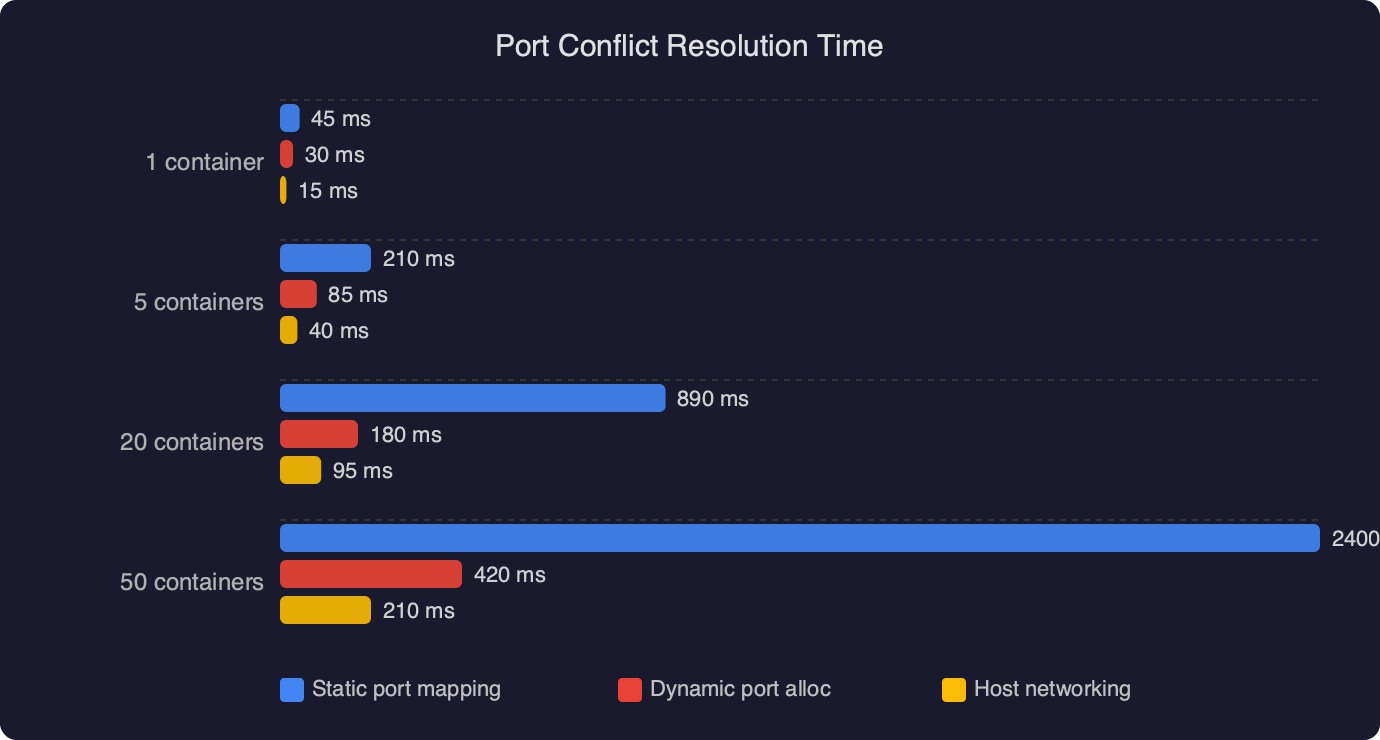
Compose stacks generate their own category of EADDRINUSE bugs. The most common is a service with network_mode: host sitting next to a service with ports: ["3000:3000"]. Host-mode containers bypass the namespace isolation and bind directly on the host, so the published port collides with whatever else is running there. Docker’s host networking documentation is explicit that host mode removes namespace isolation on Linux and is a no-op on Docker Desktop’s macOS and Windows builds. If your Compose file mixes both modes and you are testing on a Mac, the bug will only surface in CI or production.
Another zombie source: docker compose down followed by docker compose up -d in a script, where the first command returns before the userland proxy has fully released its socket. You can confirm this with ss -ltnp during the gap. The pragmatic fix is to use --remove-orphans and to give the engine a small settle window, or better, switch to restart: always with a health check so you rarely need the down/up cycle.
Port collision in Kubernetes and swarm modes
The error changes shape on orchestrators. Kubernetes will not give you EADDRINUSE for a Pod trying to bind inside its own network namespace — Pods are isolated. You get it when a hostPort collides with another Pod scheduled to the same node, or when a DaemonSet claims a port every node needs. If you see EADDRINUSE bubbling up from a Node container in Kubernetes, check the Pod spec for hostNetwork: true first. That single flag puts the container in the node’s namespace and reproduces every host-level collision problem discussed above.
Swarm mode’s routing mesh publishes ports on every node, and conflicts there show up as service convergence failures rather than a clean EADDRINUSE. Check docker service ps <service> --no-trunc for the real reason a task is stuck in Pending.
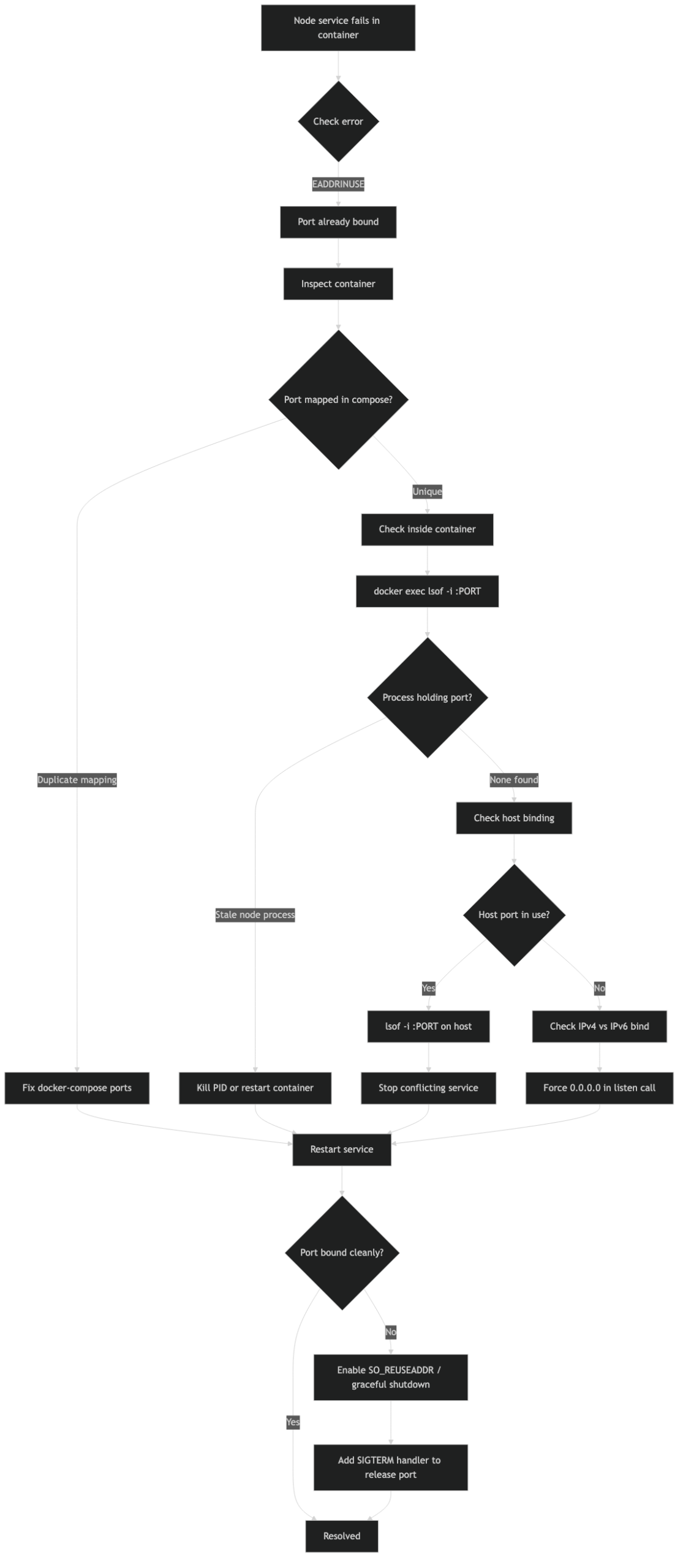
A working debugging checklist
When I hit EADDRINUSE in a Dockerized Node service, I run through these questions in order, and almost every real-world bug falls out before step four:
- Is the error coming from the Docker engine (port is already allocated) or from Node (listen EADDRINUSE)? That decides whether I look on the host or inside the container.
- If host-side:
sudo ss -ltnp 'sport = :3000', identify the owning PID, decide whether to kill it or change the published port. - If container-side:
docker execand read/proc/net/tcp. Is another process in the same container already listening? If yes, find it withps -efand fix the entrypoint or the cluster setup. - Is the container using
network_mode: hostorhostNetwork: true? If yes, treat the container exactly like a host process. - Does the Node code call
server.close()onSIGTERM? If not, restarts leak sockets until the kernel times them out.
The SIGTERM shutdown handler matters more than it looks. Docker sends SIGTERM on stop, waits 10 seconds by default, then sends SIGKILL. A Node process that ignores SIGTERM gets killed with a live listening socket, and on fast restart cycles you can race the kernel cleanup. The minimum viable handler:
const server = app.listen(3000);
for (const signal of ['SIGINT', 'SIGTERM']) {
  process.on(signal, () => {
    server.close(() => process.exit(0));
    setTimeout(() => process.exit(1), 8000).unref();
  });
}
The 8-second fallback is deliberately under Docker’s 10-second grace window so the process exits cleanly before the SIGKILL lands. Set stop_grace_period in Compose if your shutdown legitimately takes longer, but do not raise it blindly — a 60-second grace period turns a bad deploy into a minute of downtime per container.
The one takeaway that actually prevents this
Treat the published port and the in-container port as two different numbers and write your Compose files that way: ports: ["13000:3000"] for dev, ["23000:3000"] for a second stack, and so on. The in-container port stays stable so your Dockerfile and health checks never change, and host-level collisions become a one-line fix instead of a debugging session. Combine that with a real SIGTERM handler and an honest audit of any network_mode: host usage, and the EADDRINUSE error stops showing up unannounced.
Questions readers ask
Why does Docker say ‘port is already allocated’ instead of EADDRINUSE when I run docker compose up?
Those two messages point at different layers. ‘Port is already allocated’ comes from the Docker daemon on the host side when another container or process already published that host port. EADDRINUSE comes from the Node process inside the container’s own network namespace, meaning something is binding the port within the container itself. Treating them as the same issue is why debugging goes in circles.
How do I find which process is holding port 3000 on my host?
On Linux, run sudo ss -ltnp ‘sport = :3000’ to see the listening socket’s owner. If it’s docker-proxy, check docker ps to find the container publishing 3000. On macOS, use lsof -nP -iTCP:3000 -sTCP:LISTEN. On Windows PowerShell, run Get-NetTCPConnection -LocalPort 3000 | Select-Object OwningProcess, then Get-Process -Id
Why am I getting EADDRINUSE inside a Docker container when the port published fine?
Something is binding port 3000 inside the container’s namespace. Common causes are two Node processes in one container (like nodemon plus the app), a pm2-style process manager forking workers that each try to bind without SO_REUSEPORT, child_process.fork children all calling listen(), or a test runner like Jest that forgot to call server.close() before the app starts.
Should I use reusePort: true in Node to fix EADDRINUSE errors?
Only when you genuinely want multiple parallel listeners load-balancing on the same port. SO_REUSEPORT, exposed as Node’s reusePort option since v18.5, lets the kernel distribute connections across sockets bound to the same address. Using it as a blanket EADDRINUSE fix hides real bugs — two processes accidentally binding the same port will both succeed and round-robin connections unpredictably between them.